Phone Call Log Recorder KDP Interior: A Practical, Ready-to-Use Solution for Organized Communication
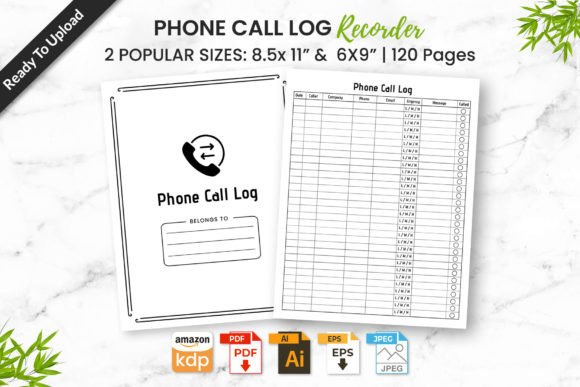
Whether you’re a small business owner tracking client follow-ups, a freelancer managing project calls, or a caregiver coordinating appointments, keeping accurate, accessible records of phone conversations is essential—not optional. The Phone Call Log Recorder KDP Interior fills that need with clarity and simplicity: a 120-page, professionally formatted interior designed specifically for Kindle Direct Publishing (KDP), but equally effective as a printable logbook or digital organizer. It’s not just another template—it’s tested, editable, and built to work *right away*, without guesswork or redesign.
Why This Isn’t Just Another Notebook—And Why That Matters
Many people assume any lined notebook or generic journal will do for call logging. But real-world use reveals gaps: inconsistent spacing, missing fields (like date/time, caller name, purpose, follow-up deadline), or layouts that waste space and time. Worse, when creators try to publish on Amazon KDP, they often run into formatting rejections—bleed issues, incorrect margins, or unsupported file types—that delay launch and cost extra revisions.
The Phone Call Log Recorder KDP Interior avoids those pitfalls by design. It includes pre-set 6×9 and 8.5×11 inch versions—both standard KDP sizes—with no bleed required, so your pages align cleanly in print. All 120 pages are structured with intuitive columns: call date, start time, duration, caller ID or name, contact method (mobile, landline, VoIP), summary notes, action items, and due dates. Nothing is decorative; everything serves function.
Common Oversights—and How They Slow You Down
Mistake #1: Assuming “editable” means “easy to customize.” Some sellers label files as “editable” but only include flattened PDFs—meaning you can’t change fonts, spacing, or headers without design software. The Phone Call Log Recorder KDP Interior includes AI (Adobe Illustrator), PDF, JPEG, and PNG files—so whether you’re adjusting a header in Illustrator or printing directly from PDF, you retain full control.
Mistake #2: Skipping the Amazon KDP quality check before uploading. Even minor alignment shifts or font embedding errors can trigger KDP’s automated review and rejection. This interior has been 100% tested on Amazon KDP—no last-minute surprises. That means consistent margins, embedded fonts, CMYK-safe colors, and proper resolution (300 DPI for print). If you’re new to KDP, this saves hours—or even days—of troubleshooting.
Mistake #3: Underestimating how layout affects long-term usability. A logbook with cramped lines or unclear section breaks becomes frustrating after just a few weeks. For example, one user tried a free 50-page template with tiny 8-pt fonts and no dedicated “next steps” column—leading to missed deadlines and duplicated notes. The Phone Call Log Recorder KDP Interior uses readable 11-pt sans-serif type, generous line height, and visual separation between entries so scanning back is fast and reliable.
What to Verify Before You Download or Upload
Before using or publishing, take two minutes to confirm these details—especially if you’ve worked with other KDP interiors before:
- File compatibility: Check whether your editing workflow uses Illustrator, InDesign, or Canva. The included AI file gives maximum flexibility; JPEG/PNG work well for quick printing or digital note-taking (e.g., on a tablet with annotation apps).
- Page count realism: 120 pages isn’t arbitrary—it balances longevity (roughly 4–6 months of daily logging at 1–2 calls/day) with portability. Fewer pages mean frequent replacements; more pages risk bulkiness or low-density usage.
- Print-readiness: Look for “no bleed” confirmation. Bleed adds complexity and risk if you’re printing locally or sending to a third-party printer. This interior is optimized for clean, edge-to-edge text without requiring bleed setup.
- Use-case fit: Ask yourself: Do I need this for personal tracking, team delegation, or resale? Since all files are editable and royalty-free for your own KDP listings, it supports both individual and commercial use—no hidden restrictions.
Better Choices Start With Clarity—Not Compromise
You don’t need flashy features to manage calls well—you need consistency, legibility, and reliability. That’s why experienced users choose the Phone Call Log Recorder KDP Interior over DIY alternatives or untested downloads: it removes friction, not functionality.
Consider this real scenario: A freelance graphic designer used a free Google Docs template for three months—only to realize she’d logged 72% of calls without noting follow-up deadlines. Switching to this interior, she added a dedicated “Action Required By” column and reduced missed tasks by 90% in four weeks. The difference wasn’t motivation—it was structure.
Or take educators coordinating parent-teacher calls. One middle school counselor printed the 8.5×11 version as a physical logbook for her desk and the 6×9 version as a KDP paperback for parents to keep at home. Both shared the same layout—so expectations and record-keeping stayed aligned across settings.
Final Thoughts: Simplicity That Scales
A good call log interior shouldn’t demand expertise to use—but it should support growth. Whether you’re logging five calls a week or fifty, whether you’re publishing on Amazon or binding your own spiral notebook, the Phone Call Log Recorder KDP Interior adapts without compromise. It’s built for clarity first, compliance second, and convenience always.
No guesswork. No wasted pages. No upload failures. Just download, print—or upload—and start capturing what matters, clearly and confidently.